


Jump to section
Video Overview
The Dashboard, Redesigned
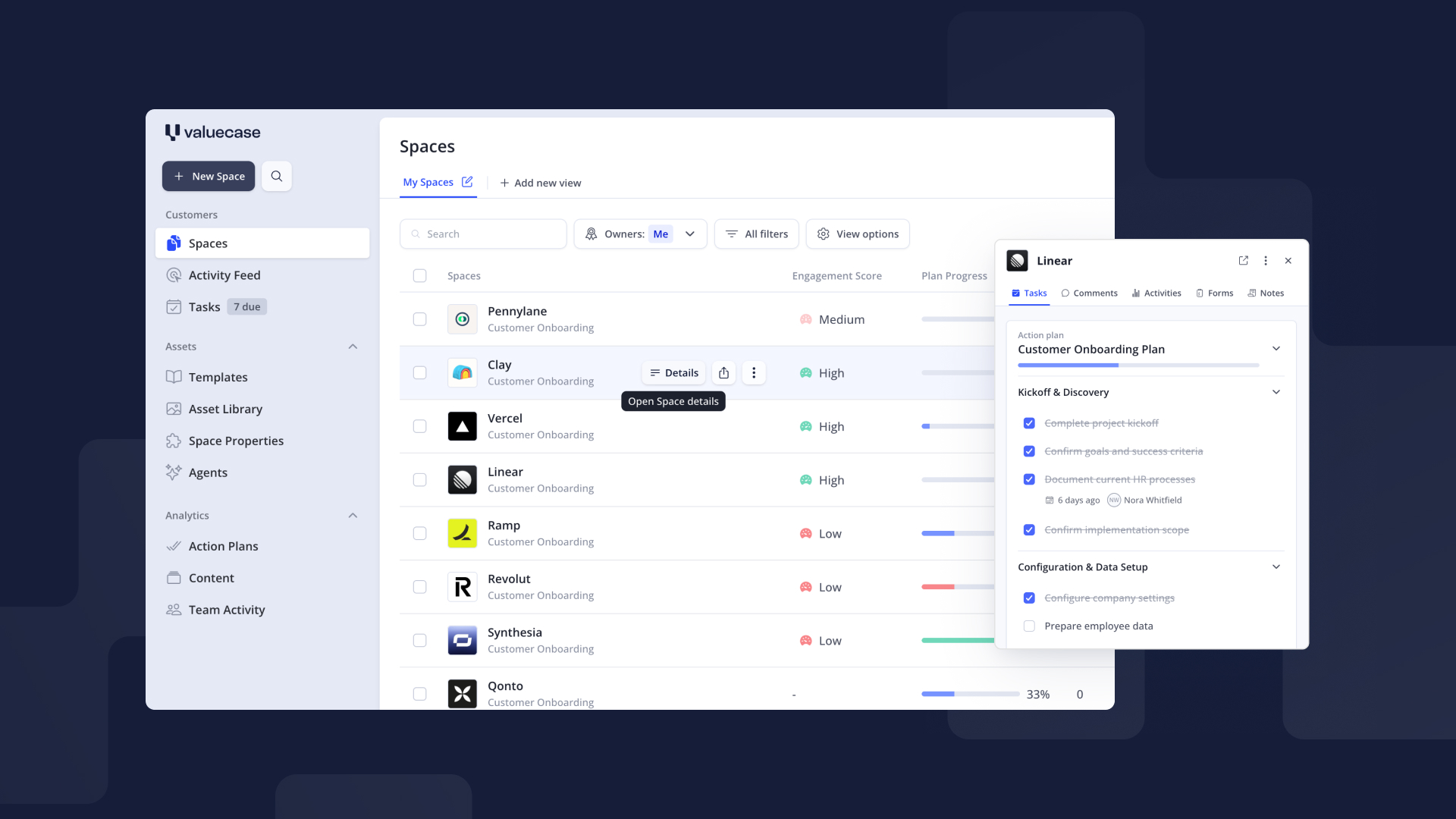
We rebuilt the Valuecase dashboard.
The old one spent the top third of your screen on a greeting and a full-width search bar before you got to any actual work. The new one opens straight into it: tighter left navigation, far more room for the table.
The new changes aren't just about looks:
- We removed the top bar, so you see ~3 more Spaces on a small screen
- On large screens, the dashboard takes the full width, so you'll see a lot more info at a glance
- Buttons, colors and font sizes are reworked for a calmer, clearer experience
The design language matches the Space Editor we shipped in January – if you've built a Space recently, the dashboard will feel immediately familiar. One product, one look.
One rename while we were at it: Team is now Team Activity, which is what it always actually showed.
Your Tasks, on a Calendar
Onboarding lives and dies by dates. Until now, those dates lived in tables and inside individual Spaces. The new task dashboard ships a brand new view that puts them where dates belong:
- Calendar view for tasks – see everything scheduled across all your Spaces, switchable between month and week display, weekends hideable
- Drag and drop to reschedule – move a task to a new day and the due date updates. No dialogs, no saving
- Change assignee and due date on the spot – click any task to open it, reassign it, move the date, comment, or mark it done without ever opening the Space
This turns the task dashboard into something closer to a team onboarding calendar: one glance tells you what's coming this week, who owns it, and what's slipping.
Get started: Dashboard → Tasks → switch to the calendar view.
Custom Views, Now Everywhere
Custom views have existed for the Space list since June 2025 – saved filters and layouts your team uses every day. With this release, the same system comes to the task dashboard and the activity feed: click "+ Add new view", set your filters, save it.
Your existing views carry over unchanged – this is an extension of something you already know, not a new concept to learn. For the activity feed, that means views like "only comments" or "only form submissions"; for tasks, e.g. a "Due / Upcoming" view.
An Activity Feed You Can Actually Read
Previously, the activity feed listed every single click in one long, ungrouped stream. Activities are now grouped by session, so you can see what a client actually did in one visit, instead of scrolling through every individual event.
Far less noise – and a much better answer to "did they even open it?"
Better Side Panels
Our side panel was one of those features people loved once they found it – and plenty never did. That changes here:
- Much easier to find: hover over any Space, Task or Activity and click "Details"
- A whole new level for single tasks: click on any task in the side panel to open a deep dive with assignees, due dates, comments and more
- Better behaviour on large screens: the panel is sticky and opens beside your view instead of above it, so you keep your context while you read
You can switch between the Space side panel and the task side panel – the task panel carries a "Back to <Space>" link so you never lose your place.
A New Template Gallery
The template gallery is redesigned and much easier to find. Browse ready-made starting points for customer onboarding and sales Spaces, and spin one up in a click.
FAQ
Is the kanban board view going away?
No. The kanban view grouped by Onboarding Stage is still there and works exactly as before – it simply isn't part of this announcement because it didn't change.
Does dragging a task on the calendar change its due date everywhere?
Yes. Moving a task to a new day sets that day as its due date, including in the Space itself.
Are custom views new?
For the Space list they launched in June 2025. This release extends them to the task dashboard and the activity feed.
Do I need to enable anything to get the new dashboard?
No. The new dashboard rolls out automatically for all users.


